Tuesday, 14 March 2017
Digitization Services: Do you know the process of KYC Document Management...
Digitization Services: Do you know the process of KYC Document Management...: Document Management System : Document it is may be paper or electronic are an essential component of any type of enterprises or busi...

Do you know the process of KYC Document Management System | Digismartek
Document it is may be paper or electronic are an
essential component of any type of enterprises or business or company. It is very
challenging task to manage business information
which I related to several sources. Depending on the type or nature of
your company , Digismartek provides the document management system services such as
storage, capture, Index, Metadata, Workflow.
KYC Document Management System : Why KYC Document Management System is very important for banks.It helps ;
- Capturing And Processing of KYC forms
- Document Security And Validation
- KYC Checking
- Scanning KYC forms
- Uploading KYC forms
- Data Entry
- You can send mail
- You can print your all documents

KYC document management system software will be used all type of banks and finance services.The process is that first Digismartek's manager check your clients KYC forms and well manged as well as check quality and quantity of KYC forms.
Scanning process will be start, used different type of scanner .Some time scanner depends upon your size of paper document.After scanning process your KYC forms ready to upload and data entry start. Using Index and metadata data entry is done.
With the help of KYC Document Management System you can email document also you can print documents.etc.
Benefits of KYC Document Management System :
- Reduce storage space
- Better Collaboration
- Better Backup
- Easier Retrieval
- Enhanced Security
- Improved Regularity Compliance
Wednesday, 8 March 2017
Digitization Services: Using document management system software can you ...
Digitization Services: Using document management system software can you ...: How you can control your paper documents? Using Document Management System Software your can control and protect your business. Finding...
Using document management system software can you control your paper documents?
How you can control your paper documents? Using Document Management System Software your can control and protect your business. Finding a reliable
and good document scanning services helps control your records and information.

Document Management System Software helps to keep safe your documents as well as your customers document. When Document management process will be start need some another important fact or services such as Scanning Services, Document Capturing , Document Indexing , Document Storing , Metadata, with the help of this factor we will successfully done you DMS process for your business.
Why important DMS process for your business : Some but most important features
- Reduce storage space
- Enhance Security
- Easier retrieval
- Better Collaboration
- Better Backup And Disaster Recovery
- Reduce time
- Fast performance
Wednesday, 22 February 2017
Digitization Services: Process of scanning management system | Digismarte...
Digitization Services: Process of scanning management system | Digismarte...: If you have number of files which is related to your customer, your business or you want to convert it in to digital format such hard copy...
Process of scanning management system | Digismartek Services
If you have number of files which is related to your
customer, your business or you want to convert it in to digital format such
hard copy document into soft copy document, and this process is called scanning
management system.
Scanning management system helps to convert your paper
document data into digital format so you can easily transfer your client’s document
or any other type of document from one place to another place also it helps to extract
data from your documents. Digismartek
scanning management is the best solutions for your paperless conversion.
Digismartek’s document management system software solutions involved
as hardware and software element such as capture ,organize, store ,scan,
import, quality control, index, data entry , export scanned images with
metadata.
- SCAN
- QUALITY CONTROL
- INDEX
- DATA ENTRY
- SCANNED IMAGES WITH METADATA

- SCAN : Digismartek is used variety of scanner it depends upon your type of documents. After scanning file imported such as PDF, JPEJ, jpg etc.
- QUALITY CONTROL : Check quality of images such as image crop , hole punch removal, border removal and more. Digismartek use Editing tools and it helps the scanning and quality control process faster and more accurate than ever.
- INDEX ,DATA ENTRY : For easy search digismartek provide the services like index , metadata and tagging text. Index files with various field types such as text, number, date and select lists.
- SCANNED IMAGES WITH METADATA : Images converted as format such as PDF, PDF/A, JPEG, GIF and metadata may be exported as TXT, CSV, XML and other customization formats.
Saturday, 17 December 2016
Digitization Services: What is scanning document management system?
Digitization Services: What is scanning document management system?: Document Management System : Document management system is computer based or you cou...
What is scanning document management system?
Document Management System :
Document management system is computer based or you could work online. Document management system is a process to convert paper document into digital format and it helps to store, track and manage all digital or software data.
Scanning Management System :
Scanning document management system help to scanned all your paper document. The scanner depends on paper, thats why need to use number of scanners.
OCR - Optical Character Recognition is a most important part in scanning management system.
Digismartek : offers best document management system software.
1. Check Paper Document :
When we are ready to document management system, compulsory check all paper. Because of sometimes paper has damaged, need to check quality of paper documents.
2.Scanning Paper Document :
Use different scanner, scanner depends upon quality of paper documents. You will need manpower if you have more than one crore paper document.
3. Transfer into Computer System :
After scanner , transfer your paper document into computer system.In computer system you could create different folder or index .
4.Easy To Search :
How you could find one page, phrase or file from different of paper documents or files.Document management system is a easy way to find the information which is you want within second.
5.Easy to share :
Easily share your files with the others.
Document management system is computer based or you could work online. Document management system is a process to convert paper document into digital format and it helps to store, track and manage all digital or software data.
Scanning Management System :
Scanning document management system help to scanned all your paper document. The scanner depends on paper, thats why need to use number of scanners.
OCR - Optical Character Recognition is a most important part in scanning management system.
 |
| Scanning Management System |
Digismartek : offers best document management system software.
- Check paper document
- Scanning paper document
- Transfer into computer system
- Easy to Search
- Easy to share
1. Check Paper Document :
When we are ready to document management system, compulsory check all paper. Because of sometimes paper has damaged, need to check quality of paper documents.
2.Scanning Paper Document :
Use different scanner, scanner depends upon quality of paper documents. You will need manpower if you have more than one crore paper document.
3. Transfer into Computer System :
After scanner , transfer your paper document into computer system.In computer system you could create different folder or index .
4.Easy To Search :
How you could find one page, phrase or file from different of paper documents or files.Document management system is a easy way to find the information which is you want within second.
5.Easy to share :
Easily share your files with the others.
Thursday, 17 November 2016
Digitization Services: Digitization Services | Scanning Document Manageme...
Digitization Services: Digitization Services | Scanning Document Manageme...: Digismartek has experienced resources and best infrastructure to provide best document management services to end user. D...
Digitization Services | Scanning Document Management System
Digismartek has experienced resources and best infrastructure to provide best document management services to end user.

Digitization or Document
management system process :
- Collect all Documents
- Document Preparation for Scanning process
- Start to document scanning process
- Document format conversion
- Indexing and Data Entry
- Ready to use Document Management System Software
- Need to collect your all document, to those documents which is you want to convert digital format.
2. Document preparation for scanning process :
- Need to remove threads, pins, staples.
3. Start to document scanning process :
- In this process ,capture all content of document in the format of CD, DVD or in the digital image.
- Need to scanned Historical and Fragile documents with great care.
- Perform Optical character Recognition on the scanned image
- Create PDF file
- Data Entry done as per client requirement
- Indexing all electronic data.
- Help to relocate documents from one place to another place.
- Supports document format like .TXT , .DOC , .PDF , .JPG , .JEPG
- Search content by using sing word or phrase or index.
- Manage or search file
- You can access multiple documents at the same time.
- Increase your business
- Save money as well time
- All time secure your document like secure document storage
Thursday, 10 November 2016
Digitization Services: Why bank document management system software is im...
Digitization Services: Why bank document management system software is im...: For unique needs Banking customers expect personal and accurate communications from their respective companies. They expect quick res...
Wednesday, 9 November 2016
Why bank document management system software is important for bank | Bank document management system software
For unique needs Banking customers expect
personal and accurate communications from their respective companies. They expect
quick result to be timely and efficient. Digismartek develop Document
management system software for successful banks
.DMS software helps to bank , higher level of customer satisfaction.

- Every bank need to use DMS software because it maintain all type of paper document which is associated with the loan application into digital format.
- Easy to find document location, using this software bank can find customer document within one click.
- For bank it is very difficult job to manage all customers paper documents which is related to loan, opening account, or any type of process. But using DMS software it will get easy way.
- DMS help to protect banks data.
- This software helps to managing and sending document from one place to another place.
- Bank can store customers all type of information from the time an account has opened.The process are online.
- Faster and Better Customer Support
- Banking DMS has a set of different type of features it allows MS Word and Excel files as well as image files which are created by scanning document management.
-
Monday, 7 November 2016
Digitization Services: How could you convert hard copy documents into dig...
Digitization Services: How could you convert hard copy documents into dig...: Document Management System Software is a best solutions for you to convert hard copy documents into digital documents or computerized docu...
How could you convert hard copy documents into digital documents? | Scanning Management System Process
Document Management System Software is a best solutions for you to convert hard copy documents into digital documents or computerized documents or online documents.
If you have number of paper documents and you need to transfer it one place to another place then how could you manage this within less time.Its totally wasting of time as well as money.
Scanning Document Management :

- So, collect your all paper documents those are old as well as new . Remove staples, pins and hard cover.And then your document is ready to scan.
- Scanning process, if your document is more than one lac (1,00,000) then you need manpower. Digismartek will provide manpower as wel as scanner too for DMS process.
- After scanning paper document converted to PDF format, or any other format.
- Search file helps to find your document immediately with the hep of Index, Keywords, Phrase.
- Then you ca transfer your file from one place to other place.
You can visit digismartek website www.digismartek.com
Best Advantages of DMS or Scanning Management System :
2. Physical Space :
Some time office space is wasted for paper document. DMS helps to save this all documents in one system / computer /online.
 Lets see the image
3. Better Customer Services
4.Lower Cost
5.Instant Access
6.Increase in Productivity
7. Strong Security.
8.Easy to use
9. Storage Document
10. Classification of Documents
If you have number of paper documents and you need to transfer it one place to another place then how could you manage this within less time.Its totally wasting of time as well as money.
Scanning Document Management :
- Paper Documents
- Scanner
- Create PDF File Format
- Search File
- Transfer File
- So, collect your all paper documents those are old as well as new . Remove staples, pins and hard cover.And then your document is ready to scan.
- Scanning process, if your document is more than one lac (1,00,000) then you need manpower. Digismartek will provide manpower as wel as scanner too for DMS process.
- After scanning paper document converted to PDF format, or any other format.
- Search file helps to find your document immediately with the hep of Index, Keywords, Phrase.
- Then you ca transfer your file from one place to other place.
You can visit digismartek website www.digismartek.com
Best Advantages of DMS or Scanning Management System :
- Cloud Access :
2. Physical Space :
Some time office space is wasted for paper document. DMS helps to save this all documents in one system / computer /online.
3. Better Customer Services
4.Lower Cost
5.Instant Access
6.Increase in Productivity
7. Strong Security.
8.Easy to use
9. Storage Document
10. Classification of Documents
Saturday, 5 November 2016
Digitization Services: Digitization Services | Document Management System...
Digitization Services: Digitization Services | Document Management System...: Digitization means we can convert paper document into digital format , the format might be an image, audio, video ,documents, sound. Di...
Digitization Services | Document Management System
Digitization means we can convert paper document into digital format , the format might be an image, audio, video ,documents, sound.

Digitization Process :
Digismartek's Digitization Process,We have done number of steps when we transfer paper document into digital format. The steps are :
1. Collection of Files :

2. Document Preparation :
3.Scanning Document :
4. Quality Control :
Digitization Process :
Digismartek's Digitization Process,We have done number of steps when we transfer paper document into digital format. The steps are :
- Collection of Files
- Document Preparation
- Scanning Document
- Quality Control
- Indexing and Uploading
- Search and Retrieval
1. Collection of Files :
- When we transfer paper document into digital format that time,need to collect all documents, the documents are old as well as new.
2. Document Preparation :
- Properly check all documents, remove staples,pins or damage part of documents. Collect all document in one place.
3.Scanning Document :
- Scan document one by one and store in one folder.
4. Quality Control :
- Checks on preparation of all type of files to confirm with internal specification also clients requirements.
- Focusing on quality checking
- Indexing , uploading and data entry is the most important part in document management system.
- Manage all document index wise
- You can search your document with the help of index like number, word, sentence.
- Within second you will get all information related to your search.
Saturday, 22 October 2016
Going paperless is a great idea

Going paperless is a great idea with the help of Document Management System. DMS helps to convert paper document into digital format.
When convert your paper document into digital document, Digismartek provides different type of services like -
- CAPTURE
- INDEX
- STORAGE
- METADATA
- WORKFLOW
- SECURITY
- PUBLISHING

- CAPTURE : With the help of scanner and printers you can capture all paper documents . In capture used two type of software such as -
ii. Optical Mark Recognition
i. Optical Character Recognition : It helps to convert digital images into machine readable text.
ii. Optical Mark Recognition : OMR software used to extract values of check-boxes or bubbles.
2. INDEX : It helps to track electronic documents.
3. STORAGE : It helps to store all type of electronic document.
4. METADATA : Metadata is a process of describing other data in details.
For Example : In a library there are many type of book available . Those books are form different authors , different subjects and all. If you will search book on particular author that time you used metadata, Like Author Name is your Metadata.
5. WORKFLOW : Workflow is really a complex process and document management system have a built-in workflow module.Workflow is divided into different type of modules -
i. Manual Workflow
ii. Rules-Based Workflow
iii.The Term Workflow
6. SECURITY : Document access available for certain type of people or group of people.
7. PUBLISHING : Publishing use following stages -
i. Acquisition
ii. Copy Editing
iii. Production
iv. Printing
v. Marketing
vi. Distribution
Friday, 30 September 2016
Digitization Services: How Document Management System Software Supports B...
Digitization Services: How Document Management System Software Supports B...: The best way to actually succeed in business regardless of your industry, is to place the customer at the center of all decisions or choi...
How Document Management System Software Supports Business
The best way to
actually succeed in business regardless of your
industry, is to place the customer at the center of all decisions or
choices thus you will deliver the most effective results.
Document Management System Software Process :

Document Management System Software Process :
Document management system software is a best solutions for paperless business or office.


For DMS software you need to use number of components.Some of them is Capture, Storage, Index,Metadata, Workflow, Security.
You can use metadata to store each and every document.The resulting extracted text can be assist users in locating documents by identifying probable keywords or providing for full text search capability, or can be used on its own. Extracted text can also be stored as a component of metadata stored with the image or text.
Main important features of Document Management System Software :

Define your access levels and your onshore, offshore teams, clients, suppliers, vendors and the stakeholders can access and update data irrespective of their physical location. You customer acquisition rates up as the response time with all information at your fingertips.
DMS enables users to scan and store digital data in a very efficient way, providing several powerful tools and time - saving features to keep your content highly accessible, exceptionally organized, and working hard for you.
Built-in Optical Character Recognition (OCR) engine, the content can be made searchable by word , Phrase or number. You can also search on the search tags entered at the time of scanning. User can Search on Folder- File Structure.
In the Document Scanning step, the documents will be categorized into several categories for the ease of retrieval. The documents which are not categorized at the time of scanning will be store under the head of unidentified documents.
2.Customized As Per Requirements -
We can provide customized solutions to meet you specific requirements. Our strong experience with customized features and functionality helps us to quickly integrate features and develop solutions in fairly quick time-frame, resulting in reduced costs for you.
3.Workflow Management -
In document management, use workflows to route documents from person to person so they can each complete their document management tasks, such as reviewing documents,approving their publication or managing their disposition


Paperless Office
For DMS software you need to use number of components.Some of them is Capture, Storage, Index,Metadata, Workflow, Security.
You can use metadata to store each and every document.The resulting extracted text can be assist users in locating documents by identifying probable keywords or providing for full text search capability, or can be used on its own. Extracted text can also be stored as a component of metadata stored with the image or text.
Main important features of Document Management System Software :
- Access From Anywhere
- Customized as per requirements
- Workflow Management
Define your access levels and your onshore, offshore teams, clients, suppliers, vendors and the stakeholders can access and update data irrespective of their physical location. You customer acquisition rates up as the response time with all information at your fingertips.
DMS enables users to scan and store digital data in a very efficient way, providing several powerful tools and time - saving features to keep your content highly accessible, exceptionally organized, and working hard for you.
Built-in Optical Character Recognition (OCR) engine, the content can be made searchable by word , Phrase or number. You can also search on the search tags entered at the time of scanning. User can Search on Folder- File Structure.
In the Document Scanning step, the documents will be categorized into several categories for the ease of retrieval. The documents which are not categorized at the time of scanning will be store under the head of unidentified documents.
2.Customized As Per Requirements -
We can provide customized solutions to meet you specific requirements. Our strong experience with customized features and functionality helps us to quickly integrate features and develop solutions in fairly quick time-frame, resulting in reduced costs for you.
3.Workflow Management -
In document management, use workflows to route documents from person to person so they can each complete their document management tasks, such as reviewing documents,approving their publication or managing their disposition
Wednesday, 28 September 2016
How to transfer paper documents to computer
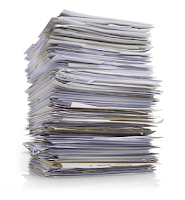
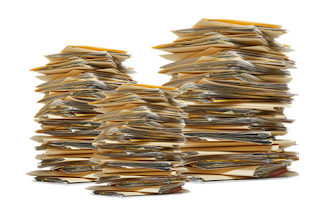

Office will be paperless is a great idea but what about previously and important paper documents.Here is smart solutions for paper document.
Document Management System Software is a best solutions to convert paper document into digital document. It helps to store all type of information.
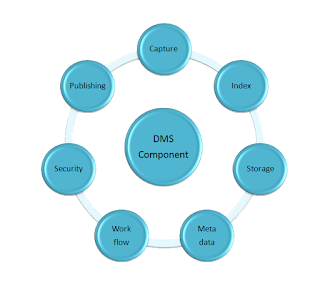
Component of Document Management System Software :
With the help of component, document management system software process is done
- CAPTURE
- INDEX
- STORAGE
- METADATA
- WORKFLOW
- SECURITY
- PUBLISHING
1.CAPTURE :
Capture helps to Accepting and processing images of file or paper documents from scanners as well as multi-function printers.
Index helps to keeping track of unique document identifiers.
- Store all electronic documents.
- Migration of the documents from one storage media to another.
4.METADATA :
MetaData Organize
- Electronic Resources,
- Provide Digital Identification,
- Helps Support Archiving
- Preservation of the Resource.
Document management systems have a built-in
workflow module.
6.SECURITY :
Allows an administrator to give access to only
certain people or groups of people.
7.PUBLISHING :
Following stages have done
- · Acquisition,
- · Copy Editing,
- · Production,
- · Printing and Marketing and
- · Distribution.
Subscribe to:
Posts (Atom)